• We’re currently investigating an issue related to the forum theme and styling that is impacting page layout and visual formatting. The problem has been identified, and we are actively working on a resolution. There is no impact to user data or functionality, this is strictly a front-end display issue. We’ll post an update once the fix has been deployed. Thanks for your patience while we get this sorted.

Question Old display output from headphone jack

Status
Not open for further replies.
Hi, as you read the title I am trying to display video from headphone jack to the old school display ports(the one with yellow red and white round cable).
This is probably so dumb. But if you know how to do it thx for help.
 
Can you parse the make and model and SKU of the laptop you're trying to work with as well as the make and model of your monitor?
My laptop is Dell G15 5511. I can't find my SKU. And also I can't reach my monitor( I'm in a different place but its an old Samsung I remember)
 
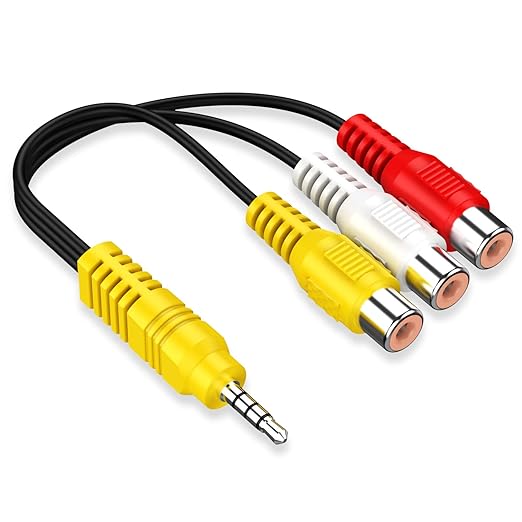
So you have an adaptor and this has a yellow output? I'm just trying to figure out what you are doing, so we can figure out where the problem is. The yellow output, I think, is the only one that can carry video. Do you have something that looks like this? Because I did a casual search of splitters and couldn't find one with a video cable. This picture below is what I'm talking about when I say 'adaptor'. If you have this, and it's not working, then your jack isn't outputting video.

61MrGXvGxNL._SX522_.jpg

Edit: never mind. just saw @Lutfij 's answer.
 
Last edited:
So you have an adaptor and this has a yellow output? I'm just trying to figure out what you are doing, so we can figure out where the problem is. The yellow output, I think, is the only one that can carry video. Do you have something that looks like this? Because I did a casual search of splitters and couldn't find one with a video cable. This picture below is what I'm talking about when I say 'adaptor'. If you have this, and it's not working, then your jack isn't outputting video.

61MrGXvGxNL._SX522_.jpg

Edit: never mind. just saw @Lutfij 's answer.
Yeah probably.
But is there a converter that converts usb to the 3.5mm video output?
 
Every device has a set number of inputs and/or outputs. Some ports will output content while others will be used to input content. The rest might be bidirectional such as a Thunderbolt port

No offence but the nature of this thread seemed like you had urgency and that you were headed towards imminent danger(fizzled out hardware due to a wrong port intrusion). We can revisit this thread once you've given us the make and model of your TV/panel.
 
Every device has a set number of inputs and/or outputs. Some ports will output content while others will be used to input content. The rest might be bidirectional such as a Thunderbolt port

No offence but the nature of this thread seemed like you had urgency and that you were headed towards imminent danger(fizzled out hardware due to a wrong port intrusion). We can revisit this thread once you've given us the make and model of your TV/panel.
Umm... The monitor was working fine last time I checked. Thank For the support tho
 
Status
Not open for further replies.

TRENDING THREADS

Latest posts

Back
Top