
-
We’re currently investigating an issue related to the forum theme and styling that is impacting page layout and visual formatting. The problem has been identified, and we are actively working on a resolution. There is no impact to user data or functionality, this is strictly a front-end display issue. We’ll post an update once the fix has been deployed. Thanks for your patience while we get this sorted.
You are using an out of date browser. It may not display this or other websites correctly.
You should upgrade or use an alternative browser.
You should upgrade or use an alternative browser.
Random Software topics
Page 9 - Love gaming? Join the PC Gamer community to share that passion with gamers all around the world!

Colif
On a Journey






























bah.
So a week or so ago I had to set up the PIN on my PC again as I had updated the BIOS and that resets the TPM which is where the PIN is stored.
'I did that and for the rest of the week my phone wanted me to set it up there as well.
I did that yesterday and it set up a passkey that I assumed was just for the phone. This used my fingerprint
Go to logon today on PC and it wants me to use passkey... on my PC... which has no way to input fingerprints
So I had to set a PIN again. (At least this week I knew what my password was which sped up to process)
This is annoying, I just want to use the Password, I guess, on my phone. Or not bother connecting them. That also works, stupid phone doesn't need to know about PC anyway
Not everyone uses a laptop, Microsoft. Will there come a time desktop PC aren't secure enough? I don't want a camera on my PC.
So a week or so ago I had to set up the PIN on my PC again as I had updated the BIOS and that resets the TPM which is where the PIN is stored.
'I did that and for the rest of the week my phone wanted me to set it up there as well.
I did that yesterday and it set up a passkey that I assumed was just for the phone. This used my fingerprint
Go to logon today on PC and it wants me to use passkey... on my PC... which has no way to input fingerprints
So I had to set a PIN again. (At least this week I knew what my password was which sped up to process)
This is annoying, I just want to use the Password, I guess, on my phone. Or not bother connecting them. That also works, stupid phone doesn't need to know about PC anyway
Not everyone uses a laptop, Microsoft. Will there come a time desktop PC aren't secure enough? I don't want a camera on my PC.
Last edited:
Colif
On a Journey
Windows 11 changed the start menu
Start has changed how the All apps screen shows. Its no longer its own tab, now its all under recommended.
Views you can pick from are:
Category self creates the groups and you can't move files between them

At least clicking the letter in the list/grid still shows the index
wish I could just show a list of categories, or at least minimise the ones I don't use all the time.
tbh I don't spend much time in the Start menu but I still don't like it.
If it really annoyed me, I could use the right click start menu
Its only thing I do in there any day.
some ways to fix it but I didn't use any
Start has changed how the All apps screen shows. Its no longer its own tab, now its all under recommended.
Views you can pick from are:
- Category
- Grid
- List
Category self creates the groups and you can't move files between them
- So it put Diablo 2 in Other instead of the games folder and I can't move it
- It put Discord in productivity... when do I start laughing?
- It created a steam folder in the Games Folder, so one extra step
- Wish I could create my own folders and move some out of tools.
- Wish I could hide some of the folders, I don't need accessibility or Creativity to always show...
At least clicking the letter in the list/grid still shows the index
wish I could just show a list of categories, or at least minimise the ones I don't use all the time.
tbh I don't spend much time in the Start menu but I still don't like it.
If it really annoyed me, I could use the right click start menu
- Right click start
- choose shutdown or turn off
- Shutdown PC
Its only thing I do in there any day.
some ways to fix it but I didn't use any
Last edited:
Colif
On a Journey
desktop being odd, just showed a Onedrive choice on desktop that wasn't there the next time I went in to see what Version history showed

The only place that menu shows is in File Explorer and since they the same program, I guess it was just a glitch. The desktop is just a folder after all.
I ran DISM & SFC yesterday so windows should be okay.
It showed up again, version history shows the folders I have backed up to Onedrive.
Now that choice shows Folder colour. and a new choice: Manage Onedrive backup.
I don't see any mention of this in Google
The only place that menu shows is in File Explorer and since they the same program, I guess it was just a glitch. The desktop is just a folder after all.
I ran DISM & SFC yesterday so windows should be okay.
It showed up again, version history shows the folders I have backed up to Onedrive.
Now that choice shows Folder colour. and a new choice: Manage Onedrive backup.
I don't see any mention of this in Google
Last edited:
Colif
On a Journey
Linux isn't as safe as it would seem
1000's of individual authors working on their own code VS 1000's of devs at Microsoft working on the same code.
Potentially more holes in the system of dependencies. Linux is less secure than MS in that regard as more ways to get in.
One of biggest way to get in to systems is through the users trust being exploited. IN the above case, a hacker managed to con the guy who created the ZIP function in Linux. It was used in everything. Lucky it was stopped or you know, internet would have had issues.
If more people use Linux, the chances of successful breaches increases. More eyes looking for holes.
If its gamings future, it will get more attention from hackers. Inevitable.
It was only ignored as most people used Windows... still do.
1000's of individual authors working on their own code VS 1000's of devs at Microsoft working on the same code.
Potentially more holes in the system of dependencies. Linux is less secure than MS in that regard as more ways to get in.
One of biggest way to get in to systems is through the users trust being exploited. IN the above case, a hacker managed to con the guy who created the ZIP function in Linux. It was used in everything. Lucky it was stopped or you know, internet would have had issues.
If more people use Linux, the chances of successful breaches increases. More eyes looking for holes.
If its gamings future, it will get more attention from hackers. Inevitable.
It was only ignored as most people used Windows... still do.
Last edited:

Zed Clampet
Community Contributor
I haven't reviewed the safety of Linux, but it will be higher than Windows for sure. And the nice thing about Linux is that you can probably find one that isn't a growing disaster like Windows. Microsoft is trying to make it all about using your phone for some reason. Windows is genuinely embarrassing compared to macOS and it's steadily getting worse. It's why there are so many people anxiously awaiting SteamOS. The day that launches it will crash Steam and create the largest exodus from Windows yet. But whether it's SteamOS or something else, Windows will eventually die unless they change directions. Other than you, I don't know a single person happy with it.Linux isn't as safe as it would seem
1000's of individual authors working on their own code VS 1000's of devs at Microsoft working on the same code.
Potentially more holes in the system of dependencies. Linux is less secure than MS in that regard as more ways to get in.
One of biggest way to get in to systems is through the users trust being exploited. IN the above case, a hacker managed to con the guy who created the ZIP function in Linux. It was used in everything. Lucky it was stopped or you know, internet would have had issues.
If more people use Linux, the chances of successful breaches increases. More eyes looking for holes.
If its gamings future, it will get more attention from hackers. Inevitable.
It was only ignored as most people used Windows... still do.
Colif
On a Journey
maybe it was the 6 years spent answering windows problems... You know, you get good at figuring out most of them if they aren't yours. Now I just get problems I have not seen before.
Its what I know, I haven't used many others.
Apart from android and BASIC and Python... but that later hasn't been used a lot. And the middle was from 40 years ago. And android is linux... so there I am using it now.
I don't want to change as that time spent answering questions would be even more of a waste of time than it already was.
I mostly leave windows alone, and don't go mad installing loads of programs. That stage happened years ago.
Microsoft have been looking for purpose for years. They missed all the big trends, Mobiles... and so they chased AI and well, its not working so well for them. If mobiles had worked for them, more people would have grown up using it, and ICT level 2 courses wouldn't have to spell out the basics of how to use Outlook (that was funny)
Its what I know, I haven't used many others.
Apart from android and BASIC and Python... but that later hasn't been used a lot. And the middle was from 40 years ago. And android is linux... so there I am using it now.
I don't want to change as that time spent answering questions would be even more of a waste of time than it already was.
I mostly leave windows alone, and don't go mad installing loads of programs. That stage happened years ago.
Microsoft have been looking for purpose for years. They missed all the big trends, Mobiles... and so they chased AI and well, its not working so well for them. If mobiles had worked for them, more people would have grown up using it, and ICT level 2 courses wouldn't have to spell out the basics of how to use Outlook (that was funny)
Zed Clampet
Community Contributor
I wouldn't say I go mad with loading tons of programs, but everything is so poorly coded, other than games, that almost any number of programs isn't great unless it's something like Tidal or Discord.maybe it was the 6 years spent answering windows problems... You know, you get good at figuring out most of them if they aren't yours. Now I just get problems I have not seen before.
Its what I know, I haven't used many others.
Apart from android and BASIC and Python... but that later hasn't been used a lot. And the middle was from 40 years ago. And android is linux... so there I am using it now.
I don't want to change as that time spent answering questions would be even more of a waste of time than it already was.
I mostly leave windows alone, and don't go mad installing loads of programs. That stage happened years ago.
Microsoft have been looking for purpose for years. They missed all the big trends, Mobiles... and so they chased AI and well, its not working so well for them. If mobiles had worked for them, more people would have grown up using it, and ICT level 2 courses wouldn't have to spell out the basics of how to use Outlook (that was funny)
I do install tons of games, but they use Unity or Unreal and don't mess with the system. It's much improved over the way games used to be.
Zed Clampet
Community Contributor
Discovering Microsoft Magnifier was an ongoing curse. It kept popping up without me calling for it. It then immediately crashed, freezing my system for a few seconds. I managed to locate the executable in CMD because Windows refused to let me look in the System folder using File Explorer. I added ".bak" to the end of the executable, so that stops it for now, but I'll have to do that after every Windows update, I suspect.
Colif
On a Journey
Did you try settings?Discovering Microsoft Magnifier was an ongoing curse. It kept popping up without me calling for it. It then immediately crashed, freezing my system for a few seconds. I managed to locate the executable in CMD because Windows refused to let me look in the System folder using File Explorer. I added ".bak" to the end of the executable, so that stops it for now, but I'll have to do that after every Windows update, I suspect.
- Accessibility/Magnifier
- Turn it off there
easier than editing windows each time. Probably also a registry setting as well, but those can be changed in updates as well.
Registry one part of windows I never look in. Can fix almost everything in OS without knowing it exists.
Guess I have found the programs I need or use now. I mainly install them when I first get a PC and not a lot changes
I make a list of the programs installed on the previous PC and just install them again.
My days of installing lots of things were over about 20 years ago. Its much easier if you don't have to fix the problems yourself...
I did all my silly installing on work PC, before they started to lock it all down in the 1990's/eearly 2000's, by time I actually had a PC I didn't need 35 Screen savers and had started to realise too much running slows things down... and having Windows ME, I installed windows a lot and you get bored of loading so much each time.
I knew someone who thought this was useful to have on PC
Not helpful on PC that virtually had no ram. My work PC would run out of resources just starting up... the good old days lol
Be nice if Xbox games files could be reused over installs like Steam games can be.
Windows is harder to break now than it used to be. People now are spoiled... use ME for a few months and then get back to me about how bad Windows is now. Win 10 I probably only clean installed 3 times, and all were to fix Hardware problems... Win 11 I am yet to need to reinstall it on either of the PC I have that run it. You can do so much to fix it now that a clean install only necessary if you can't start windows at all.
Only difference between Bonzi Buddy and Co Pilot is one is made by Microsoft
Last edited:
Zed Clampet
Community Contributor
Unfortunately that doesn't turn it off. It might supposed to turn it off, but it didn't work on my corrupted version. It still kept activating.Did you try settings?
- Accessibility/Magnifier
- Turn it off there
easier than editing windows each time. Probably also a registry setting as well, but those can be changed in updates as well.
Zed Clampet
Community Contributor
I've used Windows from the beginning. The only reason, IMO, that Windows is harder to break is because I have many years of experience with it. In a lot of ways, it's gotten more annoying, and there are numerous low effort features like the on-screen keyboard, which behaves in nonsensical ways. For instance, when you hover over it, it changes you back to the last screen that you used it. Using it all the time, that has only been useful a couple of times. The rest of the time I have to go back to the page I was on. The only other option is to have it stay on top all the time, but that covers too much of the screen.Windows is harder to break now than it used to be. People now are spoiled... use ME for a few months and then get back to me about how bad Windows is now. Win 10 I probably only clean installed 3 times, and all were to fix Hardware problems... Win 11 I am yet to need to reinstall it on either of the PC I have that run it. You can do so much to fix it now that a clean install only necessary if you can't start windows at all.
Only difference between Bonzi Buddy and Co Pilot is one is made by Microsoft
Another annoyance is just obnoxiously preventing you from doing some things, like accessing certain folders or turning off the antimalware process.

I recently ran some software and now I'm experiencing weird things on Win11.
I ran O&O ShutUp10++, which I've used many times in the past, but occasionally I run it to make sure all the settings are still enabled. I selected a few extra things that weren't selected before, nothing major, things like "Disable access to radios" and access to location data.
I also ran Windows Cleanup Utility and optimized drives with the Defragging tool.
Since then, Steam occasionally blacks out for a second and reappears. When loading into Starfield, my CPU usage spikes to 100%. Not sure if this is being caused by mods or not.
I also left my PC on for over 24 hours, which I almost never do, and after a restart the CPU usage didn't get close to 100% again even after gaming for over an hour.
Gonna have to keep poking around and see if the issue can be replicated.
I ran O&O ShutUp10++, which I've used many times in the past, but occasionally I run it to make sure all the settings are still enabled. I selected a few extra things that weren't selected before, nothing major, things like "Disable access to radios" and access to location data.
I also ran Windows Cleanup Utility and optimized drives with the Defragging tool.
Since then, Steam occasionally blacks out for a second and reappears. When loading into Starfield, my CPU usage spikes to 100%. Not sure if this is being caused by mods or not.
I also left my PC on for over 24 hours, which I almost never do, and after a restart the CPU usage didn't get close to 100% again even after gaming for over an hour.
Gonna have to keep poking around and see if the issue can be replicated.
Colif
On a Journey
Windows is a swiss army knife where they keep adding things but never quite finish them. So there are lots of parts that don't quite work as the person who fought to include them is no longer there, or its a feature like the Fax machine that did work (and probably does now) that are just forgotten.I've used Windows from the beginning. The only reason, IMO, that Windows is harder to break is because I have many years of experience with it. In a lot of ways, it's gotten more annoying, and there are numerous low effort features like the on-screen keyboard, which behaves in nonsensical ways. For instance, when you hover over it, it changes you back to the last screen that you used it. Using it all the time, that has only been useful a couple of times. The rest of the time I have to go back to the page I was on. The only other option is to have it stay on top all the time, but that covers too much of the screen.
Another annoyance is just obnoxiously preventing you from doing some things, like accessing certain folders or turning off the antimalware process.
I wanted them to finish the multiple desktop feature off, so you could have different icons on different desktops and maybe have a use for more than one. I only use it now to swap backgrounds. I have a few set but feature was a win 10 feature, maybe team who wanted it no longer exists.
I haven't tried the onscreen kb, I forgot it was there.
Windows refuses to let you turn off antimalware unless you replace it with something else. I use Malwarebytes so I don't have that service running.
Folders... they protected to stop people deleting things that are necessary,... have you tried safe mode?
do you have any hdd? You shouldn't need to defrag ssd, the system will run it once a month on C drive to make sure the System recovery data is all together on drive. Windows Defrag knows not to treat solid state like hdd anyway.I also ran Windows Cleanup Utility and optimized drives with the Defragging tool.
I used to use defraggler on HDD but as I don't have any now, I don't have it.
I haven't run disk cleanup... I don't feel I need to.
I would look at the extras you added as that is possibly cause of problem. Other things you did shouldn't be cause.I selected a few extra things that weren't selected before, nothing major, things like "Disable access to radios" and access to location data.
The uptime isn't really a problem. People leave them on for far longer.
Restart would clear ram but windows pretty good at managing that... only program I have that needs restarts every 8 hours or so is Firefox
Last edited:
Zed Clampet
Community Contributor
Edit: Sorry, Colif beat me to it. You don't have SSDs? You aren't supposed to defrag an SSD. It doesn't help anything because SSDs use flash memory. The only thing is does is significantly reduces the lifespan of the SSD.I also ran Windows Cleanup Utility and optimized drives with the Defragging tool.
Did you look to see what, exactly, was using the CPU? If this situation occurred on my PC, it would definitely be some process that didn't turn off when I such the software down that needed itI also left my PC on for over 24 hours, which I almost never do, and after a restart the CPU usage didn't get close to 100% again even after gaming for over an hour.
Gonna have to keep poking around and see if the issue can be replicated.
Zed Clampet
Community Contributor
Which is ridiculous when I'm not online and need that RAM it's using.Windows refuses to let you turn off antimalware unless you replace it with something else.
No, I find CMD easier. But this is another example, like the antimalware, of Microsoft treating its customers like morons.Folders... they protected to stop people deleting things that are necessary,... have you tried safe mode?
Colif
On a Journey
its not that bad. The only thing is does is significantly reduces the lifespan of the SSD.
When you run Defrag on an ssd on anything newer than 8, it just runs a TRIM command on the drive

What is TRIM for SSDs?
TRIM is a command that helps keep your solid state drives in shape. Here's what it does and how to check it's working.
 www.corsair.com
Defrag in Windows now is not the same as the old one. I assume the old one is part of the package but it knows what to do with ssd now.
The real and complete story - Does Windows defragment your SSD?
There has been a LOT of confusion around Windows, SSDs (hard drives), and ...
 www.hanselman.com
I have been here before, hence I had that link
Antimalware was MS trying to do something about all the virus attacks directed at them. It behaves like it does as many virus will try to shut it off, so its obviously going to be hard for users... they are collateral damage in a war between malware and MS
Windows XP without any protection lasts about 5 minutes on internet. MS decided to at least give you some.
Last edited:
Zed Clampet
Community Contributor
I don't trust random articles. There are things in that article that seem to be clearly incorrect.its not that bad
You are missing something. Heavy users who think you are supposed to defrag an SSD as you did the old drives may be doing this every 2 weeks (which was the recommendation for people who used their PCs heavily). Just for the ease of math, let's say you have a 3 TB SSD that is rated for 300 writes. Each defrag uses 3 TB of writes, which is 1 percent. If you do this every other week, that's 26 percent of your lifespan over the course of a year (and you add on top of that all your legitimate writes). Even once per month means you've used up over 10 percent of your lifespan for no reason at all.
There are also other problems with defragging an SSD. It can actually make it slower by disrupting TRIM, for instance. It also forces Windows to write in specific places instead of wear-leveling, so you can actually lose individual cells.
Last edited:
Colif
On a Journey
Windows TRIMs the drive weekly, so its unclear how much an extra trim would do. It runs it when PC is idle
Unless they use another program that hasn't been updated to recognise ssd/nvme, I don't think it would be a massive problem. I think most modern defrag programs don't run on ssd, I know defraggler wouldn't.
Those heavy users need to use drives with more writes. If they use so much data that they need to have something like my Pro drives. They are designed for the use case. Normal consumer ssd aren't designed for that much use.
I don't know everything about ssd/nvme or defrag so I can't say if your example is a really big problem or not.
Unless they use another program that hasn't been updated to recognise ssd/nvme, I don't think it would be a massive problem. I think most modern defrag programs don't run on ssd, I know defraggler wouldn't.
Those heavy users need to use drives with more writes. If they use so much data that they need to have something like my Pro drives. They are designed for the use case. Normal consumer ssd aren't designed for that much use.
I don't know everything about ssd/nvme or defrag so I can't say if your example is a really big problem or not.
Zed Clampet
Community Contributor
Unless they use another program that hasn't been updated to recognise ssd/nvme, I don't think it would be a massive problem. I think most modern defrag programs don't run on ssd, I know defraggler wouldn't.
There is actually conflicting information on this, some of which comes from Microsoft itself. And I may have misread what neo said, but my reading was that he was using a different program for defragging.
I'm on all SSDs and use the built in Windows defrag tool. It's placebo/peace of mind really. I know it's not required but still do it occasionally to, idunno... lie to myself that it did anything? 🤣 Doubt it's the cause of my issues, just wanted to mention it in case it was.do you have any hdd? You shouldn't need to defrag ssd, the system will run it once a month on C drive to make sure the System recovery data is all together on drive. Windows Defrag knows not to treat solid state like hdd anyway.
I used to use defraggler on HDD but as I don't have any now, I don't have it.
I haven't run disk cleanup... I don't feel I need to.
I click the "Optimize" button in the defragging tool. It's set to trim once a week, so it does it automatically for me. I think it's an old habit that I haven't broken in the 7-8 years since I've had my last HDD.
That's what I'm guessing also. Something changed within ShutUp10++ that could be causing this. It's kind of a serious tool and can mess things up badly if you're not careful. It does a great job at explaining everything, but I had to have clicked something that started to cause this "microstutters" for lack of a better word. It's only happening when clicking through the Steam client and when booting up games.I would look at the extras you added as that is possibly cause of problem. Other things you did shouldn't be cause.
I typically turn my PC off every night but this was an exception. Just becaus that was the case doesn't mean being on for that long caused the issues, it was one thing that I did know was different vs typical use.The uptime isn't really a problem. People leave them on for far longer.
Restart would clear ram but windows pretty good at managing that... only program I have that needs restarts every 8 hours or so is Firefox
I didn't. What do you recommend to use to view that, Task Manager?Did you look to see what, exactly, was using the CPU? If this situation occurred on my PC, it would definitely be some process that didn't turn off when I such the software down that needed it
I'm certain it was the Starfield.exe because the CPU usage only shot up when I hit play. I played a bit more this morning and CPU usage didn't exceed 50% when first booting it up.
I think the issue is somewhat resolved. I will need to do more testing to confirm, but after shutting it off last night, playing a bit this morning and during lunch, I didn't notice the CPU usage spiking like last night. However Steam still shows a microstutter when clicking through different tabs and games in the library. Black screen for an 8th of a second then back to normal, just never noticed that before.
Zed Clampet
Community Contributor
When you do the defrag, does the grid pop up and it shows each cell as it works?I'm on all SSDs and use the built in Windows defrag tool. It's placebo/peace of mind really. I know it's not required but still do it occasionally to, idunno... lie to myself that it did anything? 🤣 Doubt it's the cause of my issues, just wanted to mention it in case it was.
I click the "Optimize" button in the defragging tool. It's set to trim once a week, so it does it automatically for me. I think it's an old habit that I haven't broken in the 7-8 years since I've had my last HDD.
That's what I'm guessing also. Something changed within ShutUp10++ that could be causing this. It's kind of a serious tool and can mess things up badly if you're not careful. It does a great job at explaining everything, but I had to have clicked something that started to cause this "microstutters" for lack of a better word. It's only happening when clicking through the Steam client and when booting up games.
I typically turn my PC off every night but this was an exception. Just becaus that was the case doesn't mean being on for that long caused the issues, it was one thing that I did know was different vs typical use.
I didn't. What do you recommend to use to view that, Task Manager?
I'm certain it was the Starfield.exe because the CPU usage only shot up when I hit play. I played a bit more this morning and CPU usage didn't exceed 50% when first booting it up.
I think the issue is somewhat resolved. I will need to do more testing to confirm, but after shutting it off last night, playing a bit this morning and during lunch, I didn't notice the CPU usage spiking like last night. However Steam still shows a microstutter when clicking through different tabs and games in the library. Black screen for an 8th of a second then back to normal, just never noticed that before.
Task Manager would be good enough, but since it hasn't happened again, I wouldn't worry about it. It could have been something as simple as having an app that didn't close properly and was hogging a lot of RAM. Chrome does that sometimes. It's supposed to dump it when something else needs it, but I've noticed that doesn't always happen. When your RAM gets full, a ton of things happen involving the CPU, one is that it has to manage complex memory management, which if you have a game running, is a pretty big job. It has to compress files, it moves things from what little RAM is left to the SSD back and forth as fast as it can, and it also starts micromanaging background processes, turning them off and then, since they were open originally, turns them back on as soon as it can, Of course now it's also working launching these processes. Anyway, that's another thing to check if it happens again. If you have less RAM available than the game's system specs say you need, then it's going to be impacting your CPU.
Colif
On a Journey
I click the "Optimize" button in the defragging tool. It's set to trim once a week, so it does it automatically for me. I think it's an old habit that I haven't broken in the 7-8 years since I've had my last HDD.
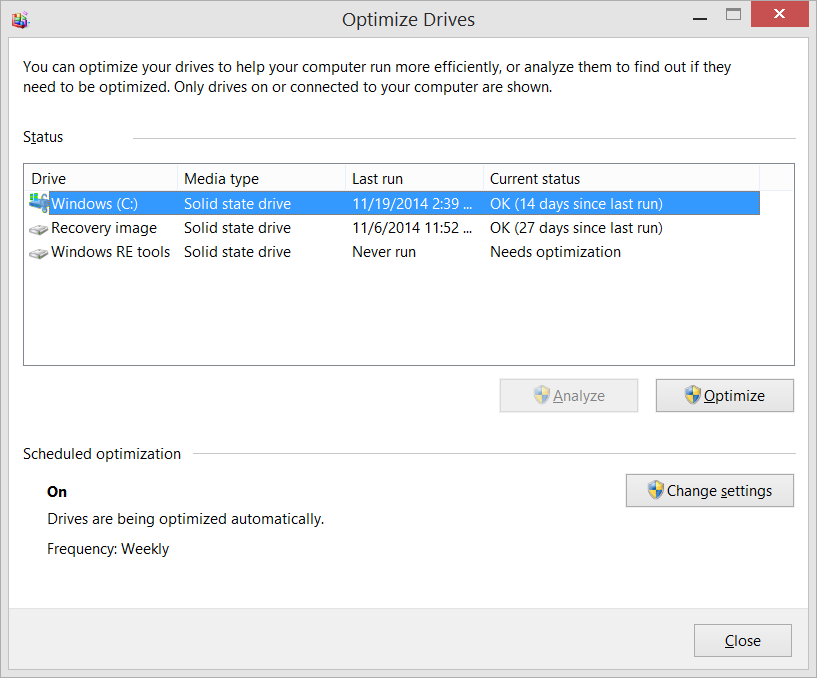
when you run defrag on Win 11, you get

which recognises SSD and shows it runs trim.
Here is what happens when you manually optimize an SSD:
- TRIM Commands are Issued: The operating system tells the SSD controller which data blocks are no longer needed (e.g., from deleted files). This allows the drive to erase those blocks in the background (Garbage Collection), ensuring future write operations are fast and efficient.
- Maintains High Write Speeds: By marking blocks as free, the SSD does not have to perform a "read-erase-modify-write" cycle when storing new data, which prevents the drive from becoming sluggish.
- Reduces Write Amplification: It ensures that only necessary data is moved around internally, reducing the total amount of writes to the flash memory, thus extending the drive's life.
- Performs "Retrim" (if necessary): If automatic background TRIM commands were missed or dropped, a manual optimization forces a full "retrim" to bring the file system in sync with the SSD's flash memory.
- Wear Leveling Optimization: The process helps the drive ensure that data is evenly distributed across all memory cells, preventing individual cells from wearing out too fast.
I miss running defrag and watching it change the locations and colours of the blocks. It used to suck on Win 98 as any background process would cause it to start again, later versions of windows fixed that and it would just take forever to run on full drives. As I swapped to mostly SSD, I used it less and less, and now... no hdd so no need.
Just remove it from maintenance, the PC already runs it auto.
I used to enjoy watching AV scans too but they too fast now.
All my little time wasters are gone.
Don't need to clean drives either, if you set up Storage Sense
Manage drive space with Storage Sense - Microsoft Support
How to use Storage Sense to free up hard drive space on your Windows device.
 support.microsoft.com
I don't have a storage space issue so I just haven't enabled that yet. Same reason I don't bother with Disk Clean-up - Only install I had to run that on was a Virtual Machine I had made that only had 30gb of space and always needed to delete system updates to run more. I don't have any of those on this install.
NO mention of chkdsk so I just let that pass 😀
Last edited:
Zed Clampet
Community Contributor
You might find Resource Monitor relaxing. Or you could go into PowerShell and tell it to search for something that doesn't exist. You can even put parameters on it that change how it looks as it searches.when you run defrag on Win 11, you get
which recognises SSD and shows it runs trim.
Here is what happens when you manually optimize an SSD:
its unlikely a trim operation will be under way when you optimise as they only run at idle, and if you using PC to run defrag, its not idle.
- TRIM Commands are Issued: The operating system tells the SSD controller which data blocks are no longer needed (e.g., from deleted files). This allows the drive to erase those blocks in the background (Garbage Collection), ensuring future write operations are fast and efficient.
- Maintains High Write Speeds: By marking blocks as free, the SSD does not have to perform a "read-erase-modify-write" cycle when storing new data, which prevents the drive from becoming sluggish.
- Reduces Write Amplification: It ensures that only necessary data is moved around internally, reducing the total amount of writes to the flash memory, thus extending the drive's life.
- Performs "Retrim" (if necessary): If automatic background TRIM commands were missed or dropped, a manual optimization forces a full "retrim" to bring the file system in sync with the SSD's flash memory.
- Wear Leveling Optimization: The process helps the drive ensure that data is evenly distributed across all memory cells, preventing individual cells from wearing out too fast.
I miss running defrag and watching it change the locations and colours of the blocks. It used to suck on Win 98 as any background process would cause it to start again, later versions of windows fixed that and it would just take forever to run on full drives. As I swapped to mostly SSD, I used it less and less, and now... no hdd so no need.
Just remove it from maintenance, the PC already runs it auto.
I used to enjoy watching AV scans too but they too fast now.
All my little time wasters are gone.
Don't need to clean drives either, if you set up Storage Sense
Manage drive space with Storage Sense - Microsoft Support
How to use Storage Sense to free up hard drive space on your Windows device.
I don't have a storage space issue so I just haven't enabled that yet. Same reason I don't bother with Disk Clean-up - Only install I had to run that on was a Virtual Machine I had made that only had 30gb of space and always needed to delete system updates to run more. I don't have any of those on this install.
NO mention of chkdsk so I just let that pass 😀
I don't remember how to do this, exactly, it's something like Get ChildItem -Recurse and...I'd have to look it up from there. Adding the extra visual stuff is very easy, but it will put on a show without setting any additional parameters.
What I'd really recommend, though, is this, although you can find similar things that just run in a particular area of the screen so you can do other things. You might be able to shrink this window, not sure
Behind Glass: Aquarium Simulator

Behind Glass: Aquarium Simulator on Steam
Create stunning virtual aquariums on your PC! Our advanced 3D engine brings your fish tank to life with breathtaking realism, featuring lifelike fish, plants, decorations, and more. Transform your monitor into a vibrant, living aquarium. Virtual aquascaping has never been easier!
Last edited:
Similar threads


- Replies
- 2
- Views
- 13K


TRENDING THREADS
-

-
-

-

-
Need help picking a gaming laptop – what should I actually focus on?
- Started by tahirmehmoodkhokhar786
- Replies: 6
-
-
