Random Hardware topics

Page 52 - Love gaming? Join the PC Gamer community to share that passion with gamers all around the world!
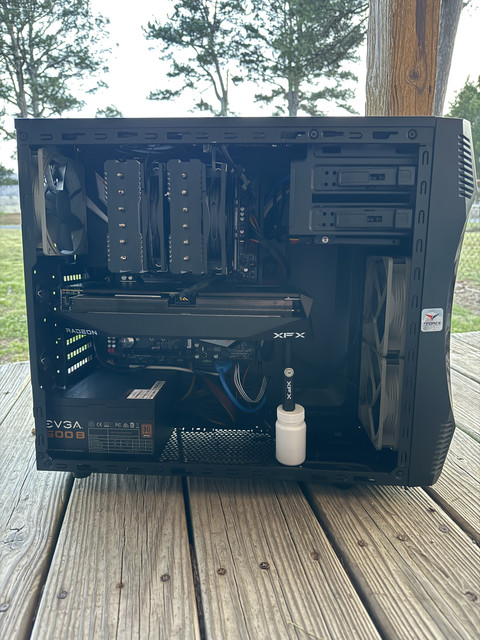
Ram clearance on air cooler is the reason I chose mine. The ram sticks in the black case are really tall and finding an air cooler that went over them and under the glass was a challenge. I didn't want to replace ram so instead chose a cooler that has no front fan at all. Instead, its got a rear fan that is too close to any rear case fans, and caused odd noises until I removed them

I7Dp9LM.jpeg

I think its dusty as its going grey... as is the glass near gpu

I might replace the rear 120mm fan next time with a spare Noctua I bought years ago. Not that I can hear it now.

There is a 140mm fan under the black section.

Too bad Deepcool are blocked for sale in USA.

Shame they don't make a white version of this

There are cheaper options but I didn't care, I like what it looks like.
 
Last edited:
My XFX stand would have lined up with a fan underneath and I did think of moving the fan, but instead I chose an alternative. Moving fans would have disturbed air pattern and putting a fan over PSU wouldn't have been as effective. The transparent stand is magnetic and sits on a ledge next to the fan, can almost not see it any more. Better choice than the black stand I had from 7900 XT

sX9FqT5.jpeg

I read its better to hold card up between fans 2 and 3 so that is why mine isn't at end of card. Probably not so bad on a 2 fan card. Not as heavy and its probably unlikely to sag

it’s not very dusty under there at all and everything still works and stays cool.
its unlikely to get dusty under the CPU cooler given the fan air would blow down in there from the edges of the heat sink or sides of the fans

Under my air cooler is the heat sink for my nvme and all the extra air from my middle fan can exhaust over it and cool the the vrm area. Even without a rear exhaust I keep vrm cool - most of the rear fans air probably goes over it and having 5 intake fans means I have plenty of air flowing through case.
KFnClgK.jpeg

front fans and air cooler look after CPU, the other two fans just on PCH for now but might change once I start playing games.

Starting to like having my CPU temp showing on the multi section display on motherboard, nice to see at a glance what PC is doing.
 
Last edited:
Cleaned the PC really good yesterday. Even cleaned the drives a bit. Tons of games installed that I haven't played in well over 5-6 months or more. I have a total of 3.5TB, only using about 600GB total of it all. I have all this space, not sure why I felt the need to make more. I guess it annoys me a bit having a large game take up space that I'm not even playing.

GPU idle temp got down to 25C last night, CPU got to 30C. Still amazed how cool this gets.

its unlikely to get dusty under the CPU cooler given the fan air would blow down in there from the edges of the heat sink or sides of the fans
I was mainly thinking if the cooler being so close to the RAM would cause lots of heat. It doesn't, though it's probably not the most ideal. There's maybe a 1-2mm gap between bottom of cooler and top of RAM stick. RAM also has a heatshield so maybe that helps. If anything, the heat rising from the RAM would be sucked in by the CPU cooler and blown out as cool air anyways. CPU hasn't reached 60C in a long time as far as I can tell, so still within fully acceptable temp range. If it hit 60C regularly I'd be more concerned on how to reduce temps.
 
I guess it annoys me a bit having a large game take up space that I'm not even playing.
I used to have really slow internet, so downloading a game again would take time. So I kept games on my playstation that I never played, mainly as the time taken to get them back was a bigger barrier.

I have lots of space now but still removed some games I don't play. But those were xbox for windows games and I am tempted to just stop subscription to that.

CPU hasn't reached 60C in a long time as far as I can tell, so still within fully acceptable temp range. If it hit 60C regularly I'd be more concerned on how to reduce temps.
I guess you mean cores but its unclear. My CPU Cores only hit 60 at start up, they normally run at 33c at idle. I could actually reduce that temp but I have my air cooler set to silent mode, not performance. Difference is 300rpm on the max speed of fans. 60c isn't really hot anyway and only happens at start up.

Package ranges from 44 to 50c, its almost always warmer than cores unless I run a Cinebench test.

The ram really doesn't get hot. mine runs at 42c, and the CPU is already warmer than that. So its not going to be noticeable, air from intake fans would cool it a little (ignores your hdd cages)
 
GPU idle temp got down to 25C last night, CPU got to 30C. Still amazed how cool this gets.
much of it depends on your ambient temps. We are still in summer but its the end so lowest I get is about 15c at night... in a few months that will be max for the day and my temps at night when heater is off will be lower. New insulation in house means I don't know what to expect.

Think lowest I seen on this CPU was about 19c last year. A screen shot from last year shows System 1 (which is motherboard temp) as 19c when best I can do now is 33c
GPU only 2 months old and it has been down to about 33c. Its operating range during day is 33 to 40 max. That is just running you tube
Seems in Crimson Desert GPU hits about 79c in the menu. but thats with everything on Ultra at 119fps (I didn't look at what resolution) - compiling shaders may have helped
 
Last edited:

Toughest part about having an AMD GPU now is AMD's unwillingness to make FSR more compatible with a larger array of games and hardware. The FSR 4.1 leak we saw last week clearly proved it was capable of running on RDNA 2 and 3 cards with limitations. People would much rather have the option to use it with those limitations than be locked out of it entirely. Because of AMD's stance on locking FSR 4 and 4.1 to RX 9000 series GPUs only means less devs will be wanting to implement it in their games. Not to mention lack of Vulkan support which has been a problem since FSR 1.

FSR 4.1 works and looks fantastic on Crimson Desert, and I wish more people could use it. Even though I'm able to take advantage of these features, it still sours the whole community knowing AMD is locking out older cards from using it when it's been proven so many times that they are capable.
 
oughest part about having an AMD GPU now is AMD's unwillingness to make FSR more compatible with a larger array of games and hardware. The FSR 4.1 leak we saw last week clearly proved it was capable of running on RDNA 2 and 3 cards with limitations. People would much rather have the option to use it with those limitations than be locked out of it entirely. Because of AMD's stance on locking FSR 4 and 4.1 to RX 9000 series GPUs only means less devs will be wanting to implement it in their games. Not to mention lack of Vulkan support which has been a problem since FSR 1.

saw that linked last night.

Perhaps it was more important to release 4.1 first since to AMD, you can still buy those cards. People who have older cards aren't as important to support.
 

saw that linked last night.

Perhaps it was more important to release 4.1 first since to AMD, you can still buy those cards. People who have older cards aren't as important to support.
Makes sense from a business standpoint but still leaves behind a lot of their customer base. At least Nvidia has the decency to put DLSS on a few generations older GPUs.

The primary thing that disappoints me is the lack of dev support. Why would they support it if it takes time and resources to implement, and only a small handful of gamers can actually use the tech? Also what's up with lack of Vulkan support? I don't know how many games run on DX12 vs Vulkan, but there are many popular games using Vulkan that could really use the FSR support.
 

TRENDING THREADS

Latest posts

Back
Top