Random Hardware topics

Page 52 - Love gaming? Join the PC Gamer community to share that passion with gamers all around the world!
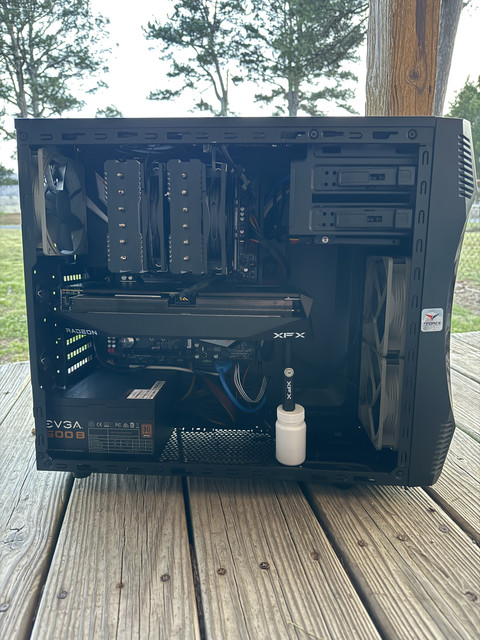
Ram clearance on air cooler is the reason I chose mine. The ram sticks in the black case are really tall and finding an air cooler that went over them and under the glass was a challenge. I didn't want to replace ram so instead chose a cooler that has no front fan at all. Instead, its got a rear fan that is too close to any rear case fans, and caused odd noises until I removed them

I7Dp9LM.jpeg

I think its dusty as its going grey... as is the glass near gpu

I might replace the rear 120mm fan next time with a spare Noctua I bought years ago. Not that I can hear it now.

There is a 140mm fan under the black section.

Too bad Deepcool are blocked for sale in USA.

Shame they don't make a white version of this

There are cheaper options but I didn't care, I like what it looks like.
 
Last edited:
My XFX stand would have lined up with a fan underneath and I did think of moving the fan, but instead I chose an alternative. Moving fans would have disturbed air pattern and putting a fan over PSU wouldn't have been as effective. The transparent stand is magnetic and sits on a ledge next to the fan, can almost not see it any more. Better choice than the black stand I had from 7900 XT

sX9FqT5.jpeg

I read its better to hold card up between fans 2 and 3 so that is why mine isn't at end of card. Probably not so bad on a 2 fan card. Not as heavy and its probably unlikely to sag

it’s not very dusty under there at all and everything still works and stays cool.
its unlikely to get dusty under the CPU cooler given the fan air would blow down in there from the edges of the heat sink or sides of the fans

Under my air cooler is the heat sink for my nvme and all the extra air from my middle fan can exhaust over it and cool the the vrm area. Even without a rear exhaust I keep vrm cool - most of the rear fans air probably goes over it and having 5 intake fans means I have plenty of air flowing through case.
KFnClgK.jpeg

front fans and air cooler look after CPU, the other two fans just on PCH for now but might change once I start playing games.

Starting to like having my CPU temp showing on the multi section display on motherboard, nice to see at a glance what PC is doing.
 
Last edited:
Cleaned the PC really good yesterday. Even cleaned the drives a bit. Tons of games installed that I haven't played in well over 5-6 months or more. I have a total of 3.5TB, only using about 600GB total of it all. I have all this space, not sure why I felt the need to make more. I guess it annoys me a bit having a large game take up space that I'm not even playing.

GPU idle temp got down to 25C last night, CPU got to 30C. Still amazed how cool this gets.

its unlikely to get dusty under the CPU cooler given the fan air would blow down in there from the edges of the heat sink or sides of the fans
I was mainly thinking if the cooler being so close to the RAM would cause lots of heat. It doesn't, though it's probably not the most ideal. There's maybe a 1-2mm gap between bottom of cooler and top of RAM stick. RAM also has a heatshield so maybe that helps. If anything, the heat rising from the RAM would be sucked in by the CPU cooler and blown out as cool air anyways. CPU hasn't reached 60C in a long time as far as I can tell, so still within fully acceptable temp range. If it hit 60C regularly I'd be more concerned on how to reduce temps.
 

TRENDING THREADS

Latest posts

Back
Top