


Question USB on motherboard not working, send help

I recently built a PC (first time) , problem is my the USB port on the motherboard is not working, when I plugged in my keyboard the lights light up but when I type something it doesn't work. the other ports works but is just that one USB 2.0 port not working properly, is there anyways I can fix it?
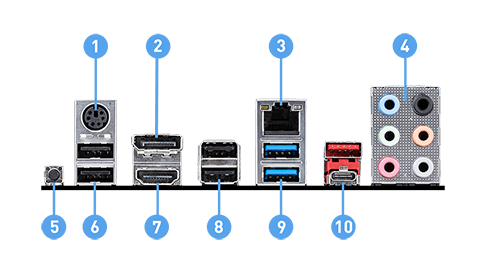
msi-b550-a_pro-io.png
number 6 is not working


components I used:
motherboard: MSI b550 A-pro
CPU: Ryzen7 3700x
ram: corsair vengeance LPX 2x8 3200Mhz
graphic card: gigabyte 1660 super
PSU: AeroCool LUX 550w 80+ bronze
SSD: Kingston A400 240GB SATA3 2.5" SSD Internal
 
Just off the top of my head, have you tried a different keyboard? Also what brand and model is the keyboard? Understand that there are some keyboards that are USB 3.0, this mean while you can plug it into a 2.0 it will not run at 3.0 speeds. This means it will not function properly, make sure you plug in blue USBs to blue USBs.
 
Just off the top of my head, have you tried a different keyboard? Also what brand and model is the keyboard? Understand that there are some keyboards that are USB 3.0, this mean while you can plug it into a 2.0 it will not run at 3.0 speeds. This means it will not function properly, make sure you plug in blue USBs to blue USBs.
for the brand.. lets just say it's a cheap local brand keyboard, but judging from the USB plug it looks 2.0 but other than that i plugged my keyboard to another USB port the keyboard still works fine. I've tried plugging in a flash disc, same thing like the keyboard, it didn't read the device, nor any notification that a device is plugged in ykw i mean.
 
Back
Top












