• Here's to an absolutely incredible 2026 for each and every one of you!

New motherboard suggestion for ASUS TUF RTX 5070

Jan 2, 2026
7
2
15
I need a new (used maybe) motherboard that will work with the ASUS TUF RTX 5070, I already purchased. my current ASRock Z390 Extreme4 motherboard (was released on October 8, 2018) does not seem to want to work, no-matter what i do.

Looking for used ATX, mid-price Intel 12th or 13th gen / DDR4 motherboard w/ built in Wi-Fi. (does not have to be a Z series chip set), but should be decent.

this pc will be in my home office running a bit of Word and AutoCAD during the day and some casual AAA gaming at night.

after I select a motherboard, i will pick a CPU. and upgrade to window 11 home

the rest of my system:
Intel Core i7-9700K
ASRock Z390 Extreme4 (intel) w/ latest UEFI (BIOS): P4.30F (w/ Resizable BAR, beta version) released 09/06/2022, note: this is a PCIe 3.0 card
4 x 8 GB Corsair Vengeance LPX DDR4 3200 MHz
- New GPU, Not working: ASUS TUF Gaming GeForce RTX 5070 12GB GDDR7 OC Edition
- Old and Working GPU: EVGA RTX 3060 XC 12 GB
ADATA SX8200PNP, 1 TB, NVMe (boot)
Seasonic FOCUS GX-750 80+ GOLD (4 1/2 yr. old)
Network: Intel Wi-Fi 6 AX200 M.2 type E
Scythe Fuma 2 Quiet CPU Cooler
Microsoft Windows 10 Home (x64) Build 19045.6691 (22H2)
Lian Li Lancool 207 filled with Noctua fans
 
What is the problem with using the Motherboard you have now??

Finds answer to his question:
My computer ran fine with an EVGA 3060 XC (12 GB) changed to the new ASUS TUF Gaming GeForce RTX 5070, machine wont post, it just sits there. wont post or do anything but turn on the fans and RGB lighting.

1 out of every 5 times, if I just let it sit there it will try to re-post a couple of times and maybe fix itself, if I just don’t touch it for 5-6 min, the computer might boot successfully, BUT only if the NVIDIA drivers have crashed and OS boots form the Windows Video Drivers instead. while on Win video driver’s device manager gave me some info:
General/Device Status/”windows has stopped this device because it has reported problem (Code43)”. of course, the card is useless without the drivers. upon reboot the computer returns to the no-post condition (no matter how many times I boot it) until I have removed the card and put back my working rtx 3060 and boot it up once. then put the 5070 back in. and maybe I repeat the process.

found on Reddit.

Code 43 in Device Manager means Windows detected a hardware or driver issue and stopped the device, often showing a yellow exclamation mark; common fixes involve updating/reinstalling drivers,

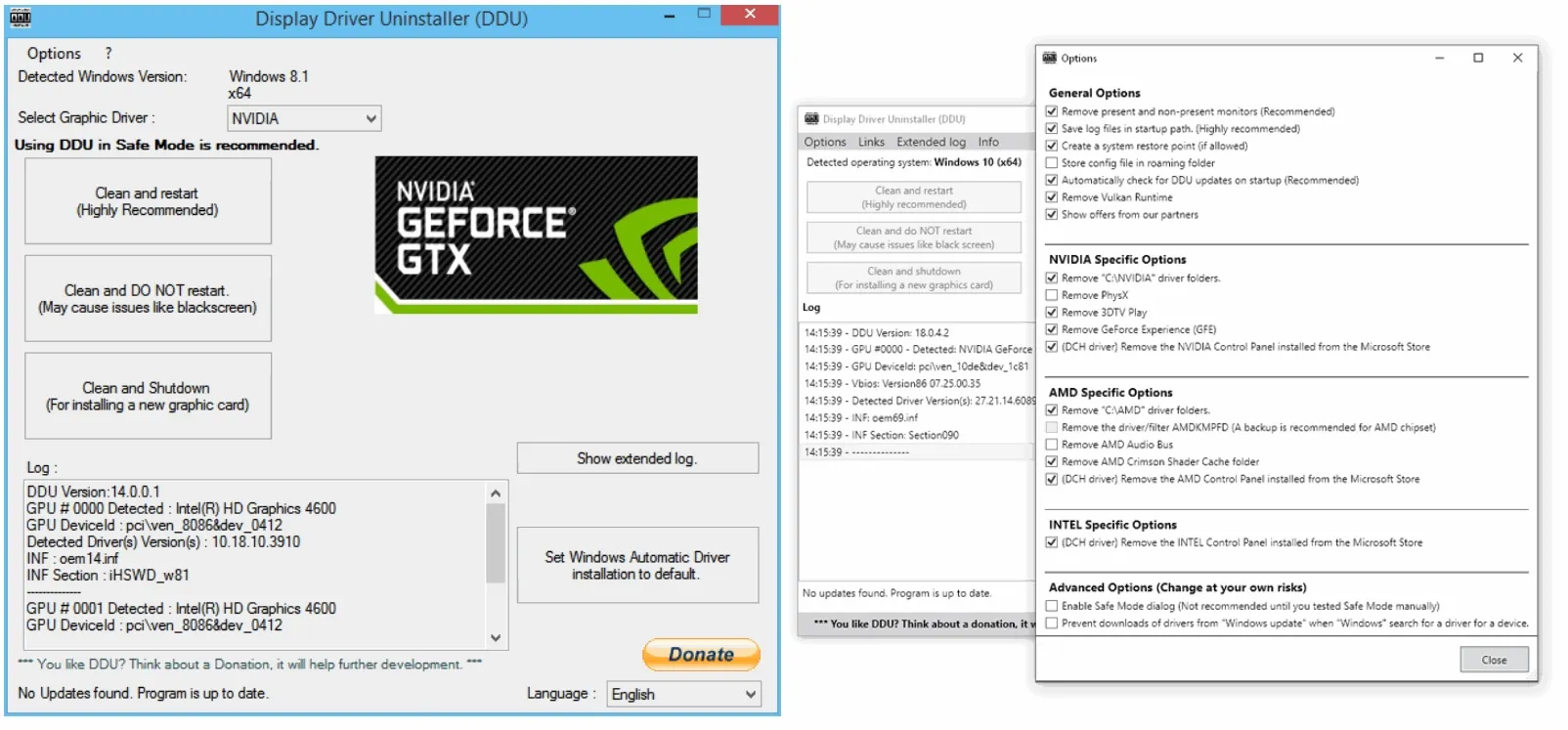
Did you try running DDU? it might help. unlikely that it seems, perhaps try uninstalling Nvidia drivers before installing a new Nvidia GPU as that might at least get you past the stage you at. Then download latest from Nvidia and see if it works properly


install that
Boot into safe mode
Run DDU and uninstall Nvidia Drivers
turn off PC and swap the new GPU in with power unplugged.
Boot back into normal mode
Install Nvidia drivers.

I need to do that myself in a few weeks when I upgrade GPU. Just because both cards made by same company, doesn't mean they work the same with the drivers.

Seasonic PSU shouldn't be the cause... 750 more than enough.
The Asus GPU only needs a 600.
PSU calculators recommend 600w for entire system... fan count may have been wrong but I was guessing you had about 3. I was close enough. Not likely to make enough difference. So it shouldn't be a lack of power.

I assume you have the 16 pin Power cable attached to the Card?
Your PSU doesn't by default have a 16 pin cable but I see the GPU has an adapter cable to convert 2 8 pins
Make sure its plugged in right, Asus even have instructions about it on their website:
IRQPHDA.jpeg

Link
 
Last edited:
  • Like
Reactions: Kaamos_Llama
if you ran ddu and wiped the drivers, on the following restart it should load the windows display driver. and run as normal. Does that boot normally?
So what happens if you install the drivers after that? get any errors?
If that works, does it then stop working after the next restart?

It shouldn't be the motherboard if it starts up with the windows display driver.
Drivers shouldn't really effect boot, as windows doesn't even start until after POST.
 
Jan 2, 2026
7
2
15
it only starts every 12th time with the windows display driver, the rest of the time the computer does not post, fans run and LED lighting works, but no successful post beep.

My motherboard is just over 6 years old, for whom ever asked.

Here is my boot log, for an unsuccessful boot attempt. you can see directX is not loading.

Microsoft (R) Windows (R) Version 10.0 (Build 19041)
1 3 2026 12:47:20.500
BOOTLOG_LOADED \SystemRoot\system32\ntoskrnl.exe
BOOTLOG_LOADED \SystemRoot\system32\hal.dll
BOOTLOG_LOADED \SystemRoot\system32\kd.dll
BOOTLOG_LOADED \SystemRoot\system32\mcupdate_GenuineIntel.dll
BOOTLOG_LOADED \SystemRoot\System32\drivers\CLFS.SYS
BOOTLOG_LOADED \SystemRoot\System32\drivers\tm.sys
BOOTLOG_LOADED \SystemRoot\system32\PSHED.dll
BOOTLOG_LOADED \SystemRoot\system32\BOOTVID.dll
BOOTLOG_LOADED \SystemRoot\System32\drivers\FLTMGR.SYS
BOOTLOG_LOADED \SystemRoot\System32\drivers\msrpc.sys
BOOTLOG_LOADED \SystemRoot\System32\drivers\ksecdd.sys
BOOTLOG_LOADED \SystemRoot\System32\drivers\clipsp.sys
BOOTLOG_LOADED \SystemRoot\System32\drivers\cmimcext.sys
BOOTLOG_LOADED \SystemRoot\System32\drivers\werkernel.sys
BOOTLOG_LOADED \SystemRoot\System32\drivers\ntosext.sys
BOOTLOG_LOADED \SystemRoot\system32\CI.dll
BOOTLOG_LOADED \SystemRoot\System32\drivers\cng.sys
BOOTLOG_LOADED \SystemRoot\system32\drivers\Wdf01000.sys
BOOTLOG_LOADED \SystemRoot\system32\drivers\WDFLDR.SYS
BOOTLOG_LOADED \SystemRoot\system32\drivers\WppRecorder.sys
BOOTLOG_LOADED \SystemRoot\system32\drivers\SleepStudyHelper.sys
BOOTLOG_LOADED \SystemRoot\System32\Drivers\acpiex.sys
BOOTLOG_LOADED \SystemRoot\System32\drivers\ACPI.sys
BOOTLOG_LOADED \SystemRoot\System32\drivers\WMILIB.SYS
BOOTLOG_LOADED \SystemRoot\system32\drivers\wd\WdBoot.sys
BOOTLOG_LOADED \SystemRoot\System32\drivers\intelpep.sys
BOOTLOG_LOADED \SystemRoot\system32\drivers\WindowsTrustedRT.sys
BOOTLOG_LOADED \SystemRoot\System32\drivers\IntelTA.sys
BOOTLOG_LOADED \SystemRoot\System32\drivers\WindowsTrustedRTProxy.sys
BOOTLOG_LOADED \SystemRoot\System32\drivers\pcw.sys
BOOTLOG_LOADED \SystemRoot\System32\drivers\msisadrv.sys
BOOTLOG_LOADED \SystemRoot\System32\drivers\pci.sys
BOOTLOG_LOADED \SystemRoot\System32\drivers\vdrvroot.sys
BOOTLOG_LOADED \SystemRoot\system32\drivers\pdc.sys
BOOTLOG_LOADED \SystemRoot\system32\drivers\CEA.sys
BOOTLOG_LOADED \SystemRoot\System32\drivers\partmgr.sys
BOOTLOG_LOADED \SystemRoot\System32\drivers\spaceport.sys
BOOTLOG_LOADED \SystemRoot\System32\drivers\volmgr.sys
BOOTLOG_LOADED \SystemRoot\System32\drivers\volmgrx.sys
BOOTLOG_LOADED \SystemRoot\System32\drivers\mountmgr.sys
BOOTLOG_LOADED \SystemRoot\System32\drivers\storahci.sys
BOOTLOG_LOADED \SystemRoot\System32\drivers\storport.sys
BOOTLOG_LOADED \SystemRoot\System32\drivers\stornvme.sys
BOOTLOG_LOADED \SystemRoot\System32\drivers\iaStorAC.sys
BOOTLOG_LOADED \SystemRoot\System32\drivers\EhStorClass.sys
BOOTLOG_LOADED \SystemRoot\System32\drivers\fileinfo.sys
BOOTLOG_LOADED \SystemRoot\System32\Drivers\Wof.sys
BOOTLOG_LOADED \SystemRoot\system32\DRIVERS\file_tracker.sys
BOOTLOG_LOADED \SystemRoot\system32\drivers\wd\WdFilter.sys
BOOTLOG_LOADED \SystemRoot\system32\DRIVERS\fltsrv.sys
BOOTLOG_LOADED \SystemRoot\system32\DRIVERS\tib.sys
BOOTLOG_LOADED \SystemRoot\System32\Drivers\Ntfs.sys
BOOTLOG_LOADED \SystemRoot\System32\Drivers\Fs_Rec.sys
BOOTLOG_LOADED \SystemRoot\system32\drivers\ndis.sys
BOOTLOG_LOADED \SystemRoot\system32\drivers\NETIO.SYS
BOOTLOG_LOADED \SystemRoot\System32\Drivers\ksecpkg.sys
BOOTLOG_LOADED \SystemRoot\System32\drivers\tcpip.sys
BOOTLOG_LOADED \SystemRoot\System32\drivers\fwpkclnt.sys
BOOTLOG_LOADED \SystemRoot\System32\drivers\wfplwfs.sys
BOOTLOG_LOADED \SystemRoot\System32\DRIVERS\fvevol.sys
BOOTLOG_LOADED \SystemRoot\System32\drivers\volume.sys
BOOTLOG_LOADED \SystemRoot\System32\drivers\volsnap.sys
BOOTLOG_LOADED \SystemRoot\system32\DRIVERS\snapman.sys
BOOTLOG_LOADED \SystemRoot\System32\drivers\rdyboost.sys
BOOTLOG_LOADED \SystemRoot\System32\Drivers\mup.sys
BOOTLOG_LOADED \SystemRoot\system32\drivers\iorate.sys
BOOTLOG_LOADED \SystemRoot\System32\drivers\hwpolicy.sys
BOOTLOG_LOADED \SystemRoot\System32\drivers\disk.sys
BOOTLOG_LOADED \SystemRoot\System32\drivers\CLASSPNP.SYS
BOOTLOG_LOADED \SystemRoot\System32\drivers\cdrom.sys
BOOTLOG_LOADED \SystemRoot\system32\drivers\filecrypt.sys
BOOTLOG_LOADED \SystemRoot\system32\drivers\UCPD.sys
BOOTLOG_LOADED \SystemRoot\System32\Drivers\Null.SYS
BOOTLOG_LOADED \SystemRoot\System32\Drivers\Beep.SYS
BOOTLOG_LOADED \SystemRoot\System32\drivers\dxgkrnl.sys
BOOTLOG_NOT_LOADED \SystemRoot\System32\drivers\dxgkrnl.sys
BOOTLOG_LOADED \SystemRoot\System32\DriverStore\FileRepository\basicdisplay.inf_amd64_19e58b6267591a82\BasicDisplay.sys
BOOTLOG_NOT_LOADED \SystemRoot\System32\drivers\dxgkrnl.sys
BOOTLOG_LOADED \SystemRoot\System32\DriverStore\FileRepository\basicrender.inf_amd64_eebb5a8467eb88ec\BasicRender.sys
BOOTLOG_LOADED \SystemRoot\System32\Drivers\Npfs.SYS
BOOTLOG_LOADED \SystemRoot\System32\Drivers\Msfs.SYS
BOOTLOG_LOADED \SystemRoot\System32\Drivers\CimFS.SYS
BOOTLOG_LOADED \SystemRoot\system32\DRIVERS\tdx.sys
BOOTLOG_LOADED \SystemRoot\System32\DRIVERS\netbt.sys
BOOTLOG_LOADED \SystemRoot\system32\drivers\afunix.sys
BOOTLOG_LOADED \SystemRoot\system32\drivers\afd.sys
BOOTLOG_LOADED \SystemRoot\System32\drivers\vwififlt.sys
BOOTLOG_LOADED \SystemRoot\System32\drivers\pacer.sys
BOOTLOG_LOADED \SystemRoot\System32\drivers\ndiscap.sys
BOOTLOG_LOADED \SystemRoot\system32\drivers\netbios.sys
BOOTLOG_LOADED \SystemRoot\System32\drivers\Vid.sys
BOOTLOG_LOADED \SystemRoot\system32\DRIVERS\rdbss.sys
BOOTLOG_LOADED \SystemRoot\system32\drivers\nsiproxy.sys
BOOTLOG_LOADED \SystemRoot\System32\drivers\npsvctrig.sys
BOOTLOG_LOADED \SystemRoot\System32\drivers\mssmbios.sys
BOOTLOG_LOADED \SystemRoot\System32\drivers\gpuenergydrv.sys
BOOTLOG_LOADED \SystemRoot\System32\Drivers\ElbyCDIO.sys
BOOTLOG_LOADED \SystemRoot\System32\Drivers\dfsc.sys
BOOTLOG_LOADED \SystemRoot\System32\Drivers\fastfat.SYS
BOOTLOG_LOADED \SystemRoot\system32\drivers\bam.sys
BOOTLOG_LOADED \??\C:\Windows\system32\drivers\AsIO2.sys
BOOTLOG_LOADED \SystemRoot\system32\DRIVERS\ahcache.sys
BOOTLOG_LOADED \SystemRoot\System32\DriverStore\FileRepository\compositebus.inf_amd64_7500cffa210c6946\CompositeBus.sys
BOOTLOG_LOADED \SystemRoot\System32\drivers\kdnic.sys
BOOTLOG_LOADED \SystemRoot\System32\DriverStore\FileRepository\umbus.inf_amd64_b78a9c5b6fd62c27\umbus.sys
BOOTLOG_LOADED \SystemRoot\System32\drivers\HDAudBus.sys
BOOTLOG_LOADED \SystemRoot\system32\drivers\ucx01000.sys
BOOTLOG_LOADED \SystemRoot\System32\drivers\USBXHCI.SYS
BOOTLOG_LOADED \SystemRoot\System32\DriverStore\FileRepository\heci.inf_amd64_c22251d5ea82b3c3\x64\TeeDriverW10x64.sys
BOOTLOG_LOADED \SystemRoot\system32\DRIVERS\wdiwifi.sys
BOOTLOG_LOADED \SystemRoot\System32\drivers\Netwtw10.sys
BOOTLOG_LOADED \SystemRoot\System32\drivers\vwifibus.sys
BOOTLOG_LOADED \SystemRoot\System32\drivers\serial.sys
BOOTLOG_LOADED \SystemRoot\System32\drivers\serenum.sys
BOOTLOG_LOADED \SystemRoot\System32\drivers\ICCWDT.sys
BOOTLOG_LOADED \SystemRoot\System32\DriverStore\FileRepository\e1d.inf_amd64_4476f5fd93c02299\e1d.sys
BOOTLOG_LOADED \SystemRoot\System32\drivers\wmiacpi.sys
BOOTLOG_LOADED \SystemRoot\System32\drivers\intelppm.sys
BOOTLOG_LOADED \SystemRoot\System32\drivers\acpipagr.sys
BOOTLOG_LOADED \SystemRoot\System32\drivers\acpitime.sys
BOOTLOG_LOADED \SystemRoot\System32\DriverStore\FileRepository\uefi.inf_amd64_c1628ffa62c8e54c\UEFI.sys
BOOTLOG_LOADED \SystemRoot\System32\drivers\NdisVirtualBus.sys
BOOTLOG_LOADED \SystemRoot\System32\DriverStore\FileRepository\swenum.inf_amd64_16a14542b63c02af\swenum.sys
BOOTLOG_LOADED \SystemRoot\system32\drivers\logi_joy_bus_enum.sys
BOOTLOG_LOADED \SystemRoot\system32\drivers\logi_joy_xlcore.sys
BOOTLOG_LOADED \SystemRoot\System32\drivers\VClone.sys
BOOTLOG_LOADED \SystemRoot\System32\drivers\rdpbus.sys
BOOTLOG_LOADED \SystemRoot\System32\drivers\UsbHub3.sys
BOOTLOG_LOADED \SystemRoot\System32\drivers\iocbios2.sys
BOOTLOG_LOADED \SystemRoot\system32\drivers\RTKVHD64.sys
BOOTLOG_LOADED \SystemRoot\system32\drivers\ksthunk.sys
BOOTLOG_LOADED \SystemRoot\system32\drivers\nvhda64v.sys
BOOTLOG_LOADED \SystemRoot\System32\drivers\hidusb.sys
BOOTLOG_LOADED \SystemRoot\System32\DriverStore\FileRepository\ibtusb.inf_amd64_ed10736ffba492c1\ibtusb.sys
BOOTLOG_LOADED \SystemRoot\System32\drivers\BTHport.sys
BOOTLOG_LOADED \SystemRoot\System32\drivers\BTHUSB.sys
BOOTLOG_LOADED \SystemRoot\System32\drivers\kbdhid.sys
BOOTLOG_LOADED \SystemRoot\System32\drivers\kbdclass.sys
BOOTLOG_LOADED \SystemRoot\System32\drivers\mouhid.sys
BOOTLOG_LOADED \SystemRoot\System32\drivers\mouclass.sys
BOOTLOG_NOT_LOADED \SystemRoot\System32\drivers\dxgkrnl.sys
BOOTLOG_LOADED \SystemRoot\System32\drivers\rfcomm.sys
BOOTLOG_LOADED \SystemRoot\System32\drivers\BthEnum.sys
BOOTLOG_LOADED \SystemRoot\System32\drivers\bthpan.sys
BOOTLOG_NOT_LOADED \SystemRoot\System32\drivers\dxgkrnl.sys
BOOTLOG_LOADED \SystemRoot\System32\drivers\Microsoft.Bluetooth.Legacy.LEEnumerator.sys
BOOTLOG_LOADED \SystemRoot\System32\drivers\BthA2dp.sys
BOOTLOG_LOADED \SystemRoot\System32\drivers\Microsoft.Bluetooth.AvrcpTransport.sys
BOOTLOG_LOADED \SystemRoot\System32\drivers\bthhfenum.sys
BOOTLOG_LOADED \SystemRoot\System32\drivers\BthHfAud.sys
BOOTLOG_LOADED \SystemRoot\system32\drivers\wcifs.sys
BOOTLOG_LOADED \SystemRoot\system32\drivers\luafv.sys
BOOTLOG_LOADED \SystemRoot\system32\drivers\cldflt.sys
BOOTLOG_LOADED \SystemRoot\system32\drivers\storqosflt.sys
BOOTLOG_LOADED \SystemRoot\system32\drivers\bindflt.sys
BOOTLOG_LOADED \SystemRoot\system32\DRIVERS\virtual_file.sys
BOOTLOG_LOADED \SystemRoot\System32\drivers\umpass.sys
BOOTLOG_LOADED \SystemRoot\System32\drivers\WUDFRd.sys
BOOTLOG_LOADED \SystemRoot\System32\drivers\mshidumdf.sys
BOOTLOG_LOADED \SystemRoot\system32\drivers\msquic.sys
BOOTLOG_LOADED \SystemRoot\system32\drivers\HTTP.sys
BOOTLOG_LOADED \SystemRoot\system32\drivers\lltdio.sys
BOOTLOG_LOADED \SystemRoot\system32\drivers\rspndr.sys
BOOTLOG_LOADED \SystemRoot\System32\DRIVERS\wanarp.sys
BOOTLOG_LOADED \SystemRoot\system32\drivers\mslldp.sys
BOOTLOG_LOADED \SystemRoot\system32\DRIVERS\nwifi.sys
BOOTLOG_LOADED \SystemRoot\system32\drivers\ndisuio.sys
BOOTLOG_LOADED \SystemRoot\System32\drivers\mpsdrv.sys
BOOTLOG_LOADED \SystemRoot\system32\DRIVERS\bowser.sys
BOOTLOG_LOADED \SystemRoot\System32\drivers\WSDPrint.sys
BOOTLOG_LOADED \SystemRoot\system32\DRIVERS\mrxsmb.sys
BOOTLOG_LOADED \SystemRoot\System32\drivers\condrv.sys
BOOTLOG_LOADED \SystemRoot\System32\drivers\WSDScan.sys
BOOTLOG_LOADED \SystemRoot\system32\DRIVERS\mrxsmb20.sys
BOOTLOG_LOADED \SystemRoot\System32\DRIVERS\srvnet.sys
BOOTLOG_LOADED \SystemRoot\System32\DRIVERS\srv2.sys
BOOTLOG_LOADED \SystemRoot\system32\drivers\mmcss.sys
BOOTLOG_LOADED \??\C:\WINDOWS\SysWOW64\speedfan.sys
BOOTLOG_LOADED \SystemRoot\system32\drivers\Ndu.sys
BOOTLOG_LOADED \SystemRoot\system32\drivers\peauth.sys
BOOTLOG_LOADED \SystemRoot\System32\drivers\tcpipreg.sys
BOOTLOG_LOADED \SystemRoot\system32\DRIVERS\tib_mounter.sys
BOOTLOG_LOADED \SystemRoot\System32\drivers\rassstp.sys
BOOTLOG_LOADED \SystemRoot\System32\DRIVERS\NDProxy.sys
BOOTLOG_LOADED \SystemRoot\System32\drivers\vwifimp.sys
BOOTLOG_LOADED \SystemRoot\System32\drivers\AgileVpn.sys
BOOTLOG_NOT_LOADED \SystemRoot\System32\DRIVERS\NDProxy.sys
BOOTLOG_LOADED \SystemRoot\System32\drivers\rasl2tp.sys
BOOTLOG_NOT_LOADED \SystemRoot\System32\DRIVERS\NDProxy.sys
BOOTLOG_LOADED \SystemRoot\System32\drivers\raspptp.sys
BOOTLOG_NOT_LOADED \SystemRoot\System32\DRIVERS\NDProxy.sys
BOOTLOG_LOADED \SystemRoot\System32\DRIVERS\raspppoe.sys
BOOTLOG_NOT_LOADED \SystemRoot\System32\DRIVERS\NDProxy.sys
BOOTLOG_LOADED \SystemRoot\System32\DRIVERS\ndistapi.sys
BOOTLOG_LOADED \SystemRoot\System32\drivers\ndiswan.sys
BOOTLOG_NOT_LOADED \SystemRoot\system32\drivers\wd\WdFilter.sys
BOOTLOG_LOADED \SystemRoot\system32\drivers\wd\KslD.sys
BOOTLOG_LOADED \SystemRoot\system32\drivers\wd\WdNisDrv.sys
BOOTLOG_NOT_LOADED \SystemRoot\System32\drivers\dxgkrnl.sys
BOOTLOG_LOADED \SystemRoot\System32\DriverStore\FileRepository\nv_dispsi.inf_amd64_383c5255ad7f81b4\nvlddmkm.sys
 
Jan 2, 2026
7
2
15
for colif

1. i ran ddu several times form safe mode, and installed card with no drivers and would not boot successfully.

2. after several attempts at complete power down restarts, the computer finally booted after about 6 min of self repair.
then installed NVIDIA 591.44 nvidia driver in custom mode clean install, (before that the 5070 was running on win drivers) screen went black about 2/3 threw the install procedure, but computer appears to have continued running and finish the install of the driver, screen never came back, upon restart, would not post again.

3. my current guess is that my motherboard bios will not communicate correctly with the 5070 vbios. some line of code is wrong and it just hangs up..

i guess i should install a working gpu and create a boot log so i can see where it deviates.
 
  • Like
Reactions: Why_Me
2. after several attempts at complete power down restarts, the computer finally booted after about 6 min of self repair.
This makes me think you have Fast startup turned on, as windows wouldn't need to repair on startup if it was off

turn it off while we fix this. If you have an ssd you don't need it on anyway.

I wonder if its been part of the problem. Windows 10 with fast startup enabled is never actually off. Shutting it down just puts it into a hibernation state. If you unplug the PC in this state it can corrupt windows... as its asleep, not off. Only times a PC in this state is actually off is a restart
its main purpose is to make HDD seem faster at startup. SSD don't benefit from the boost as they fast enough already.

I don't know if the vbios thing is a correct answer. If BIOS didn't like card, it wouldn't work at all and not show windows. BIOS doesn't have access to the windows drivers, its completely separate. So it makes no sense that it works with one driver and not the other.

There is one way to find out what is happening during install process:
 
  • Like
Reactions: Why_Me
Jan 2, 2026
7
2
15
fast startup: that option did not show up in control panel for me.
i have fast boot disabled in Bios, always have. i have a NVME drive

I want to perform a clean install of windows 11, but i have to finish some big project, before my computer can be wiped.

i will post my results when they happen.