• We’re currently investigating an issue related to the forum theme and styling that is impacting page layout and visual formatting. The problem has been identified, and we are actively working on a resolution. There is no impact to user data or functionality, this is strictly a front-end display issue. We’ll post an update once the fix has been deployed. Thanks for your patience while we get this sorted.

Transporting a MicroATX cube?

My next PC will be in either a Thermaltake v21 or Apevia X-Qber. Any idea if bags exist for the carrying of a cube-like PC to places like other people's houses and/or anime conventions?
 
It's generally an extremely risky idea to transport desktop PCs, as there's a rather high chance it'll just not work one day after moving it. something gets knocked off and the thing doesn't post, or your hard drive gets corrupted, ect.

They do make backpacks for em, this one fits the Apevia, but the thermal take is a bit too big for it I believe.
 
It's generally an extremely risky idea to transport desktop PCs, as there's a rather high chance it'll just not work one day after moving it. something gets knocked off and the thing doesn't post, or your hard drive gets corrupted, ect.

They do make backpacks for em, this one fits the Apevia, but the thermal take is a bit too big for it I believe.

I agree. It's a little risky to transport a desktop of any size - even a small cube of a PC. Desktops aren't designed to withstand a steady dose of knocks, bumps, and drops. They are designed to sit on top of a desk. 😉

If you want to travel with a PC then I would suggest a decent gaming laptop.

-=- Boris
 
My next PC will be in either a Thermaltake v21 or Apevia X-Qber. Any idea if bags exist for the carrying of a cube-like PC to places like other people's houses and/or anime conventions?

Hey dude, I'm not agree with people who say that is not a good idea to make a small gaming pc travelling ready!
Actually two months ago I made a computer configuration exactly with that purpose, and it's my tiny monster right now!
The Fact is that I move very often to a city to another and laptops are not good in overclocking, are usually very expensive for high end component, start to be obsolete after some year and it's difficult to upgrade hardware (almost impossible sometime), so you know, I love desktop PC and I liked the idea to have my personal always with me so here I am..... I have a tiny PC and a nice backbag to bring with me my configuration during fly ( I will not send my PC in a box neither bording in a fly, he come with me 🙂 ).
It's vey solid and I usually put some soft material inside empty space (beetween CPU cooler and Video Card for istance)
My idea came from some video on youtube like this one and I use exactly the same case with some more mod for better air flow.
But if you live in the USA you could have a lot of other option for compact PC cases like DANCASE, LOQUE GHOST and others small and nice solution ; )

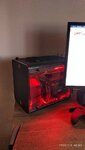
IMG_20200201_095023.jpg

My Build at the vey moment ^^
 
I transport my mid-tower desktop all the time. It is moderately risky but its not THAT risky. I mean, they throw those things in to shipping trucks and haul them across the country. A little car ride is not a big deal!

That said, you should be a little smart about it. Make sure your components are definitely well seated. Use a carrying strap. I use an Antec one and it's served me well for years and years. Don't throw the desktop in to your trunk and hope for the best. Instead, position it behind your passenger seat, and then move the seat back so as to sort of vice the desktop between the back of the front seat and back seat cushion. Maybe put a blanket or hoodie underneath/around it. And when you're carrying it, use the strap over your shoulder and grab the handle, and go slowly.

Sure, it's not ideal, but it's not impossible. Also: https://www.pcgamer.com/how-to-move-your-pc/

Now, back in the day, I had a friend who rolled his desktop across campus on a longboard for LAN parties. That wouldn't be advisable... but it still worked 😆
 
If it's easily done, I'd at least remove the graphics card before transporting your desktop. I'd take care to keep the machine on its side, or whichever orientation allows the motherboard to rest parallel to the ground, so that the weight of the components is not hanging off of the board, but resting on top of it.
 

TRENDING THREADS

Latest posts

Back
Top