• We’re currently investigating an issue related to the forum theme and styling that is impacting page layout and visual formatting. The problem has been identified, and we are actively working on a resolution. There is no impact to user data or functionality, this is strictly a front-end display issue. We’ll post an update once the fix has been deployed. Thanks for your patience while we get this sorted.

SSD/HDD

I'm not entirely sure which category to post this in, but I figured as it most involves gaming here would be a good start?

My SSD seems to be overflowing with OS and general rubbish, I only currently have an internal HDD.

I'm looking at grabbing an external drive, I assume SSD will out perform the HDD but I intend to use it as my main STEAM library. I've read there was some issues doing this unless STEAM itself is installed on the same drive as your library, but does anyone have any advice for or against this?

And what particular drives I should be looking for , solely for this purpose.
 
Steam will be fine with games installed to a secondary disk. I do this myself in two of my systems at home.

That said, I'd advice against an external HDD; you're already taking a pretty substantial performance hit by loading from an HDD (My desktop loads games installed on its HDD significantly more slowly than my laptop with the same game loaded on my NVMe) and it's only going to be worse over an external USB connection.

Assuming you're using a desktop, there's really no reason not to choose an internal drive. It'll be both faster and cheaper. No particular suggestions on brand; couldn't even tell you what brand I have in my various computers.
 
I've read there was some issues doing this unless STEAM itself is installed on the same drive as your library, but does anyone have any advice for or against this?
none of my games are installed on the same drive as Steam, that isn't a problem. I have used another drive for games for as long as I can remember. Used to make recovering from a fresh install of windows faster, no need to download the games again.

Considering you can move steam folders between PC, this isn't a problem

My SSD seems to be overflowing with OS and general rubbish, I only currently have an internal HDD.
what size is the current hdd? I would think about replacing it instead of using external

Looking at posts you made, you have a Desktop PC so the idea of adding another internal is a good one too. Unless motherboard or case is lacking.

load times will be slower on an external drive

And what particular drives I should be looking for , solely for this purpose.

normally I would say an ssd or nvme but storage prices are silly right now.
My track record with external hdd dying isn't great. But internal drives, I would pick Western Digital or Seagate

Ideal situation is pick up an external drive enclosure and buy a drive yourself. As a lot of the ones for sale may promise to be much bigger than they really are.


thread showing age, can get 1.5tb sd cards now. Not sure about Flash drives. Samsung stopped a lot smaller. I wonder if they moved onto making fake ram as that is where money would be now... although when 4tb ssd cost over 1k here, maybe not.
 
Last edited:
If your motherboard has another M.2 NvME slot then you can get a 2TB PCIe4.0 drive for ~£220. A 1TB would cost around £140 at the moment. These prices are from scan.co.uk

You can often find these drives on sale with around £20 off the average price.

If you are going not going to replace your system for a completely new one for at least 3-4 years then it might be worth it. Just don't buy a PCIe5.0 drive - you really don't need it at the moment and they are really expensive.
 
i use this because i have problems with my hands and did not want to risk opening up my pc in case i caught something and shorted things out.


Some gamers say you are not supposed to use something like this for games especially as its external. I have used it for 2 years and not had any problems , the usb cable is not very long but its long enough for you to rest the ssd on top of your rig. After you have connected it it will be added to your steam library and you just search the relevant tab to choose the drive to install games on.

NOTE ..... once it is connect you wont have the usual right click to safely remove like you do with flash drives unless you go into its properties box and change things. When you do a virus scan it wont get scanned unless you do a separate scan from the av custom scan menu
 
I am currently using a MSI Mag B550 Tomahawk motherboard, my machine is kind of outdated now but I think if I upgrade from a 2060 to 5060 and grab myself another SSD it should see me through for another few years at least.
 
AMD B550 Chipset

6x SATA 6Gb/s ports
2x M.2 slots (Key M)
M2_1 slot (from AMD Processor)
Supports PCIe 4.0/ 3.0 x4 1
Supports SATA 6Gb/s
Supports 2242/ 2260/ 2280/ 22110 storage devices
M2_2 slot (from AMD B550 chipset)
Supports PCIe 3.0x4
Supports 2242/ 2260/ 2280 storage devices
1 The supported specification depends on installed processor.


Your motherboard can attach one more nvme, it will only run at gen 3 speeds but that is fine for games.
Or you can attach 5 more sata drives if case has the space to put them

Your motherboard has less nvme slots than the current boards but it supports more Sata ssd/hdd slots. X870 is where they stop having as many sata ports.
You have 6, I only have 4.
 
Last edited:

Your motherboard can attach one more nvme, it will only run at gen 3 speeds but that is fine for games.
Or you can attach 5 more sata drives if case has the space to put them

Your motherboard has less nvme slots than the current boards but it supports more Sata ssd/hdd slots. X870 is where they stop having as many sata ports.
You have 6, I only have 4.
Thanks Colif, would one of the specific M2 slots be better than the other or are they about as equal? (Apologies for what appear to be stupid questions).
 
Per your motherboard's specs;
Slot M2_1's max speed is PCIe4.0x4 while slot M2_2's max speed is PCIe3.0x4. What is the make and model of your NVMe SSD currently on operation? If your current drive is PCIe4.0x4 speeds and a large capacity, you can format the OS partition and drive, you can have that as the game library drive while you invest in a smaller capacity PCIe3.0x4 drive to have the OS, app's and launchers on.
 
Per your motherboard's specs;
Slot M2_1's max speed is PCIe4.0x4 while slot M2_2's max speed is PCIe3.0x4. What is the make and model of your NVMe SSD currently on operation? If your current drive is PCIe4.0x4 speeds and a large capacity, you can format the OS partition and drive, you can have that as the game library drive while you invest in a smaller capacity PCIe3.0x4 drive to have the OS, app's and launchers on.

I'll need to do some digging to find that out, as I don't have it to hand.

All I remember spec wise is that I am running a AMD Ryzen 5 3600 on the MAG B550 Tomahawk (MS-7C91) with Corsair DDR4 32GB memory at 1799Mhz and display is a RTX 2060 Super.
 
The top slot in most motherboards is linked directly to CPU and is generally faster than the other slots. On a B550, that is the case. The 2nd slot is controlled by chipset on motherboard and due to needing to communicate through the board, its slower than the top slot.

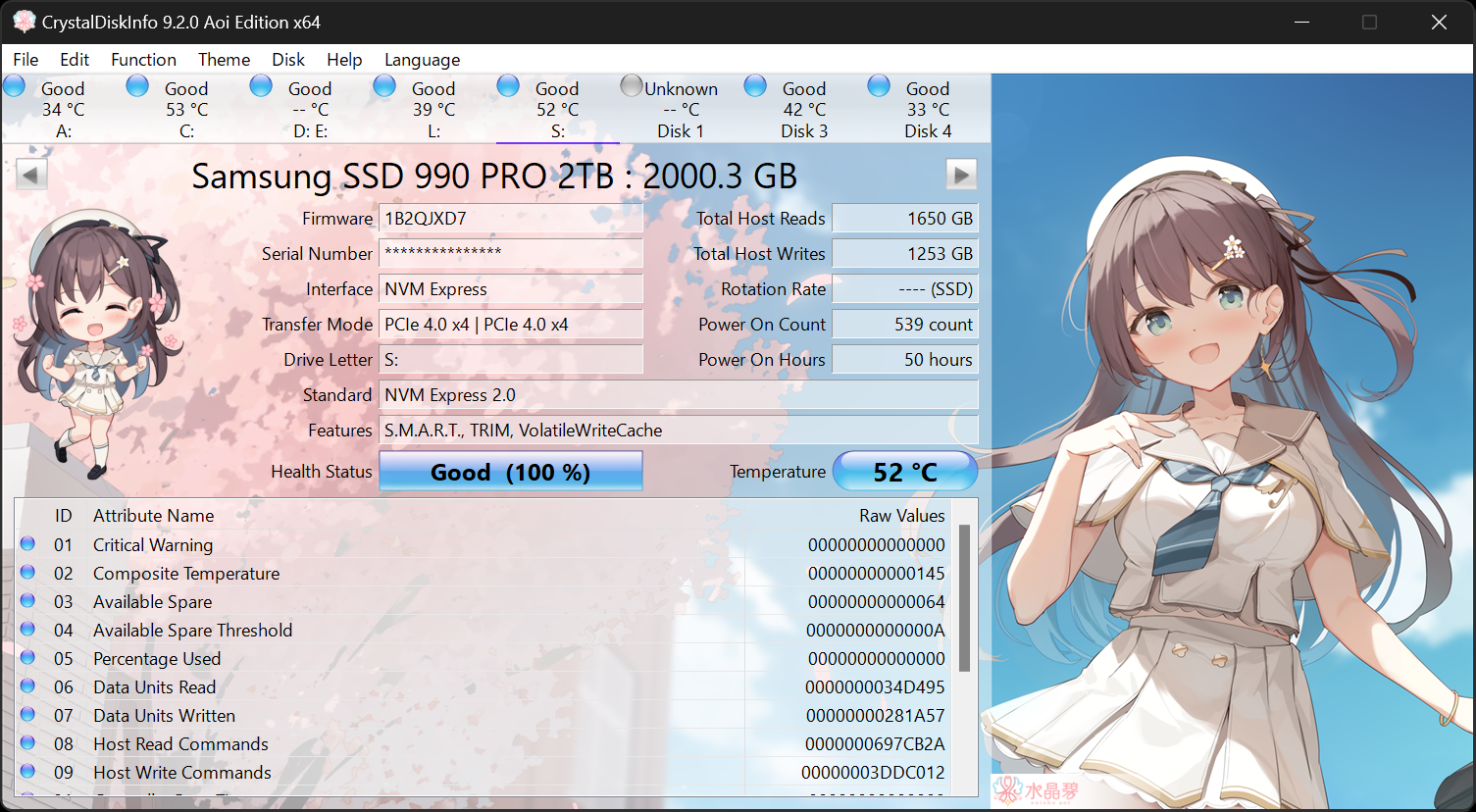
You can download Crystal disk info, it will tell you what drives you have now, as well as their health

CqY9eCm.jpeg

click on tab at top to go between drives.
Drive health dropped 1% in almost a year... I will be dead before it needs to be replaced. The other two drives are still on 100% but they hardly get any use.

If for some reason you don't want to install that, its just getting info off PC anyway.
You can search for system information application on windows search
When it opens, look in left column and choose Components/Storage/Disks and it should show you the Manufacturer and Model of all your drives.

Or you can look in device Manager
right click start, choose Device manager
click arrow next to Disk Drives, should show the names there.
 
Last edited:
The top slot in most motherboards is linked directly to CPU and is generally faster than the other slots. On a B550, that is the case. The 2nd slot is controlled by chipset on motherboard and due to needing to communicate through the board, its slower than the top slot.

You can download Crystal disk info, it will tell you what drives you have now, as well as their health

click on tab at top to go between drives.
Drive health dropped 1% in almost a year... I will be dead before it needs to be replaced. The other two drives are still on 100% but they hardly get any use.

If for some reason you don't want to install that, its just getting info off PC anyway.
You can search for system information application on windows search
When it opens, look in left column and choose Components/Storage/Disks and it should show you the Manufacturer and Model of all your drives.

Or you can look in device Manager
right click start, choose Device manager
click arrow next to Disk Drives, should show the names there.
Thank you for the advice & information Colif, I've opted for the system information route given that the UK has decided to ban IMGUR for whatever purpose and can't see the screenshot.

So, supposedly my SSD is a WDS500G3X0C-00SJGO and my HDD is ST2000DM008-2FR102. I haven't checked, but I am pretty sure my SSD is running off the slot below the CPU/GPU. So it's probably best to grab one and install it for the top slot connection and run the OS off that?
 

TRENDING THREADS

Latest posts

Back
Top